
Welcome to seabeck dance camp
We're so glad you're coming!
This year our registration system looks a little different
Step 1: Dance Package
From the Registration page, add your Dance Package to your Cart. (If you are shopping for yourself and your partner, you can purchase both Dance Packages together). You will be asked for your name, lead/follow, and any special diet for meals. You will also be asked to estimate your arrival and departure times. This helps Seabeck prepare the correct number of meals if campers arrive late or leave early. When you are done filling out the Registration form, click Add Tickets to Cart.
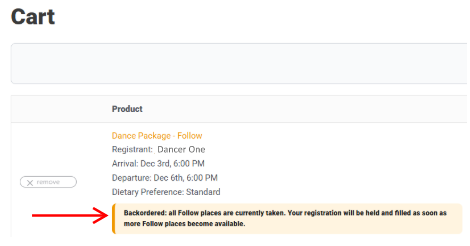
Waitlist: We balance Leads and Follows, and if there are too many of one, we have a Waitlist. When that happens, your Cart order will say the Dance Package is “Backordered.” To get on the Waitlist, go to Checkout and complete your billing information. Your credit card will not be charged until your Waitlist spot is available. Check your email to confirm your Dance Package is on Backorder and you are on the Waitlist.
If you bring a registration buddy of the opposite role, you jump to the front of the Waitlist. Contact the Registrar to let us know your buddy’s name so we can release your order when they register. karenchiu@nwdance.net
Step 2: Housing
If you are staying off campus, from the Cart, click the Proceed to Checkout button, enter your billing information, and complete the purchase. In the Additional Information box on the Checkout page, tell us you are staying off campus, so we know that you did not forget to book a room.
If you are staying on campus with a roommate, only one of you puts the room on their credit card. If your roommate purchased the room you are sharing, from your Cart, just Proceed to Checkout. Please use the box under Additional Information to provide your roommate’s name.
If you are staying on campus and need to get a room for yourself or for you and your roommate, click the Visit Store button on the Cart page to View rooms. Add to Cart and Proceed to Checkout.
If you are not ready to select a room, you can Proceed to Checkout your Dance Package and return later to select a room.
When you Checkout, note the email address you use; you should use the same one to log in when you return to book your room. When you return, go directly to Housing by clicking the Returning to Select Room button on the Seabeck Welcome page.